
Host on Codeberg Pages
Use these instructions to enable continuous deployment from a Codeberg repository to Codeberg Pages.
Do not commit the contents of the publishDir to your repository. Hugo recreates this directory when you build your project.
Prerequisites
Please complete the following tasks before continuing:
- Create a Codeberg account.
- Log in to your Codeberg account.
- Create a Codeberg repository for your project.
- Create a local Git repository for your project with a remote reference to your Codeberg repository.
- Create a Hugo project within your local Git repository and test it with the
hugo servercommand. - Commit the changes to your local Git repository and push to your Codeberg repository.
Procedure
- Step 1
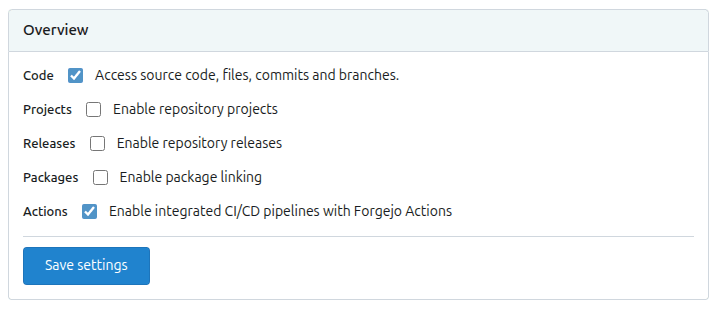
- Visit your Codeberg repository. Go to Settings > Units > Overview. Enable Actions and press the Save Settings button.
- Step 2
- Create a
hugo.yamlfile in the.forgejo/workflowsdirectory, adjusting the tool versions and time zone as needed..forgejo/workflows/hugo.yamlname: Build and deploy on: push: branches: - main workflow_dispatch: concurrency: group: ${{ forgejo.workflow }}-${{ forgejo.ref }} cancel-in-progress: true jobs: build_and_deploy: name: Build and deploy runs-on: codeberg-small env: # Define tool versions DART_SASS_VERSION: 1.105.0 GO_VERSION: 1.27.1 HUGO_VERSION: 0.167.0 NODE_VERSION: 24.21.0 # Set the build time zone TZ: Europe/Oslo # Set the Hugo base URL HUGO_BASEURL: https://${{ forgejo.event.repository.owner.username }}.codeberg.page/${{ forgejo.event.repository.name }}/ steps: - name: Checkout uses: actions/checkout@v7 with: submodules: recursive fetch-depth: 0 lfs: false - name: Create a local tools directory run: | mkdir -p "${HOME}/.local" - name: Install Dart Sass run: | echo "Installing Dart Sass ${DART_SASS_VERSION}..." curl -sfL --output-dir "${{ runner.temp }}" -O "https://github.com/sass/dart-sass/releases/download/${DART_SASS_VERSION}/dart-sass-${DART_SASS_VERSION}-linux-x64.tar.gz" tar -C "${HOME}/.local" -xf "${{ runner.temp }}/dart-sass-${DART_SASS_VERSION}-linux-x64.tar.gz" echo "${HOME}/.local/dart-sass" >> "${FORGEJO_PATH}" - name: Install Go run: | if [[ -f "go.mod" ]]; then echo "Installing Go ${GO_VERSION}..." curl -sfL --output-dir "${{ runner.temp }}" -O "https://go.dev/dl/go${GO_VERSION}.linux-amd64.tar.gz" tar -C "${HOME}/.local" -xf "${{ runner.temp }}/go${GO_VERSION}.linux-amd64.tar.gz" echo "${HOME}/.local/go/bin" >> "${FORGEJO_PATH}" fi - name: Install Hugo run: | echo "Installing Hugo ${HUGO_VERSION}..." curl -sfL --output-dir "${{ runner.temp }}" -O "https://github.com/gohugoio/hugo/releases/download/v${HUGO_VERSION}/hugo_${HUGO_VERSION}_linux-amd64.tar.gz" mkdir "${HOME}/.local/hugo" tar -C "${HOME}/.local/hugo" -xf "${{ runner.temp }}/hugo_${HUGO_VERSION}_linux-amd64.tar.gz" echo "${HOME}/.local/hugo" >> "${FORGEJO_PATH}" - name: Install Node.js run: | if [[ -f "package-lock.json" ]]; then echo "Installing Node.js ${NODE_VERSION}..." curl -sfL --output-dir "${{ runner.temp }}" -O "https://nodejs.org/dist/v${NODE_VERSION}/node-v${NODE_VERSION}-linux-x64.tar.gz" tar -C "${HOME}/.local" -xf "${{ runner.temp }}/node-v${NODE_VERSION}-linux-x64.tar.gz" echo "${HOME}/.local/node-v${NODE_VERSION}-linux-x64/bin" >> "${FORGEJO_PATH}" fi - name: Log tool versions run: | echo "Logging tool versions..." command -v sass &> /dev/null && echo "Dart Sass: $(sass --version)" || echo "Dart Sass: not installed" command -v go &> /dev/null && echo "Go: $(go version)" || echo "Go: not installed" command -v hugo &> /dev/null && echo "Hugo: $(hugo version)" || echo "Hugo: not installed" command -v node &> /dev/null && echo "Node.js: $(node --version)" || echo "Node.js: not installed" - name: Configure Git run: | echo "Configuring Git..." git config --global core.quotepath false - name: Fetch full Git history run: | if [[ $(git rev-parse --is-shallow-repository) == true ]]; then echo "Fetching full Git history..." git fetch --unshallow fi - name: Initialize Git submodules run: | if [[ -f .gitmodules ]]; then echo "Initializing Git submodules..." git submodule update --init --recursive fi - name: Install Node.js dependencies run: | if [[ -f package-lock.json ]]; then echo "Installing Node.js dependencies..." npm ci fi - name: Cache restore id: cache-restore uses: actions/cache/restore@v6 with: path: ${{ runner.temp }}/.cache/hugo key: hugo-${{ forgejo.run_id }} restore-keys: hugo- - name: Build run: | echo "Building the project..." hugo build \ --gc \ --minify \ --cacheDir "${{ runner.temp }}/.cache/hugo" - name: Cache save uses: actions/cache/save@v6 with: path: ${{ runner.temp }}/.cache/hugo key: ${{ steps.cache-restore.outputs.cache-primary-key }} - name: Deploy uses: actions/git-pages@v2 with: site: ${{ env.HUGO_BASEURL }} token: ${{ forgejo.token }} source: public/ - name: Print base URL run: | echo "Base URL: ${HUGO_BASEURL}" - Step 3
- In the project configuration file in the root of your local Git repository, set the location of the image cache to the
cacheDiras shown below.caches: images: dir: :cacheDir/images[caches] [caches.images] dir = ':cacheDir/images'{ "caches": { "images": { "dir": ":cacheDir/images" } } }See configure file caches for more information.
- Step 4
- Commit the changes to your local Git repository and push to your Codeberg repository.
- Step 5
- From Codeberg’s main menu, choose Actions. You will see something like this:

- Step 6
- When Codeberg has finished building and deploying your site, the color of the status indicator will change to green.

- Step 7
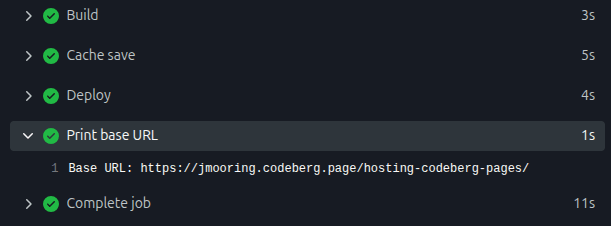
- Click on the commit message as shown above. Under the “Print base URL” step, you will see a link to your live site.
In the future, whenever you push a change from your local Git repository, Codeberg Pages will rebuild and deploy your site.
Base URL
Codeberg Pages site URLs take one of three forms:
| Site type | URL | Notes |
|---|---|---|
| Project site | https://owner.codeberg.page/repo/ | Default; no workflow changes needed |
| User/organization site | https://owner.codeberg.page/ | Repository must be named pages |
| Custom domain | https://custom-domain.org/ | Requires additional workflow changes; see below |
The HUGO_BASEURL environment variable in the example workflow targets a project site, automatically computing the URL from the repository owner’s username and repository name. For other configurations, adjust the workflow as described below.
For a user/organization site, set HUGO_BASEURL to:
https://${{ forgejo.event.repository.owner.username }}.codeberg.page/For a custom domain, set HUGO_BASEURL to:
https://custom-domain.org/And add the server parameter to the Deploy step:
- name: Deploy
  uses: actions/git-pages@v2
  with:
    site: ${{ env.HUGO_BASEURL }}
    server: codeberg.page
    token: ${{ forgejo.token }}
    source: public/
See the Codeberg documentation for more information.
Choosing a runner
Codeberg offers three hosted runners, each with a corresponding -lazy variant that may have longer queue times but helps balance load on shared infrastructure. The example workflow above uses codeberg-small for these reasons:
| Runner | Notes |
|---|---|
codeberg-tiny | The 2-minute maximum runtime is insufficient for image processing. Hugo caches processed images, but the initial run to prime that cache can exceed this limit. |
codeberg-small | A reasonable middle ground for projects with a moderate amount of image processing. Queue times can exceed 30 minutes under heavy load. If your deployment is not time-sensitive, consider using codeberg-small-lazy instead. |
codeberg-medium | Demand for these runners is high, making queue times impractical for routine deployments. |
Related resources
For more information on hosting and managing your site with Codeberg Pages, consult the official documentation: